
Download Wavify – Advanced AI Voice Integration Tool
Overview
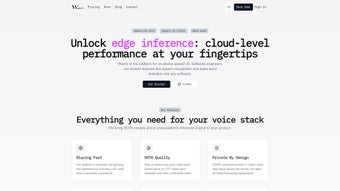
Wavify is a cutting‑edge AI voice integration platform built for developers who want to embed natural‑language interaction into their applications without compromising privacy or performance. Powered by an on‑device architecture, Wavify processes speech data locally, guaranteeing that user recordings never leave the device while still delivering cloud‑grade accuracy for Speech‑to‑Text (STT), wake‑word detection, and command handling. This combination of security, speed, and scalability makes Wavify an ideal choice for high‑responsiveness environments such as healthcare monitoring, automotive infotainment, and e‑learning tools.
What truly differentiates Wavify from generic voice SDKs is its multilingual engine and the breadth of supported platforms. Whether you are targeting a Linux server, a Windows desktop, a macOS client, an iOS mobile app, an Android device, or even a resource‑constrained embedded board, Wavify provides a consistent API surface and documentation that reduce integration effort to a few lines of code. The platform’s modular design lets you enable only the features you need—be it simple keyword spotting or full‑featured conversational AI—so you can keep your binary size small and your power consumption low.
In addition to core voice capabilities, Wavify offers advanced utilities such as custom model training, real‑time language switching, and seamless fallback to cloud services when a device cannot meet a particular latency requirement. The SDK includes robust logging, diagnostics, and over‑the‑air update mechanisms, ensuring that your voice‑enabled app stays up‑to‑date with the latest improvements in acoustic modeling and natural language understanding.
Key Features & Capabilities
- On‑Device Speech Recognition: Low‑latency STT with privacy‑first processing.
- Wake‑Word Detection: Customizable hot‑words that activate your app without touching the screen.
- Voice Command Handling: Built‑in intent parsing for quick command execution.
- Multilingual Support: Over 30 languages and dialects, with automatic language detection.
- Cross‑Platform Compatibility: Native SDKs for Linux, Windows, macOS, iOS, Android, and embedded Linux.
- Custom Model Training: Upload domain‑specific datasets to fine‑tune acoustic and language models.
- Hybrid Cloud Fallback: Seamless switch to cloud processing when on‑device resources are insufficient.
- Real‑Time Updates: OTA model and firmware updates without disrupting the user experience.
- Developer‑Friendly API: Simple JSON‑based request/response model with extensive code samples.
- Security & Privacy Controls: End‑to‑end encryption, sandboxed execution, and GDPR‑compliant data handling.
Each feature is exposed through a well‑documented set of functions that can be called from popular languages such as C++, Java, Swift, Kotlin, and Python. The SDK also includes a visual debugging console, allowing developers to view real‑time transcription, confidence scores, and acoustic waveforms directly on the device. This level of insight accelerates troubleshooting and helps you fine‑tune the voice experience for your target audience.
Because Wavify is built on top of industry‑standard neural network architectures, the models are both lightweight and highly accurate. The platform leverages quantization and pruning techniques to keep the memory footprint under 30 MB on most mobile devices while still achieving word error rates (WER) comparable to leading cloud services. For applications that demand the utmost precision—such as medical dictation or vehicle voice commands—Wavify offers a premium model tier with sub‑5 % WER across noisy environments.
Installation, Usage & Compatibility
Getting Started
Installing Wavify is straightforward. For Windows and macOS, download the installer from the official website; the package includes pre‑compiled binaries, SDK headers, and sample projects. Linux users can retrieve a .deb or .rpm package via the command line, while mobile developers obtain the Android AAR or iOS CocoaPod directly from Maven Central or CocoaPods, respectively. Embedded systems are supported through a cross‑compiled static library that can be linked with your firmware build system (e.g., Yocto, Buildroot).
After installing the SDK, add the appropriate include paths and link against the libwavify library. A minimal “Hello Voice” example demonstrates how to initialize the engine, load a wake‑word model, and start a continuous listening loop. The sample code is available in C++ for desktop platforms and in Swift/Kotlin for mobile, ensuring you can quickly prototype on any target device.
Typical Integration Flow
- Initialize the Engine: Call
Wavify::initialize()with your API key and desired configuration (language, model tier, privacy mode). - Load Resources: Load wake‑word and language models using
loadModel(). You can also provide a custom grammar file for command recognition. - Start Audio Capture: Connect the SDK to your microphone input. Wavify supports PCM, WAV, and raw audio streams.
- Process Events: Register callbacks for
onWakeWordDetected,onTranscriptionResult, andonError. The callbacks run on a background thread, so UI updates must be marshaled to the main thread. - Handle Results: Use the returned JSON payload to extract intent, confidence, and any extracted entities (e.g., dates, numbers).
- Shutdown Gracefully: Release resources with
Wavify::shutdown()when the app exits.
Operating System Support
Wavify runs natively on the following platforms:
- Windows 10/11 (x86 64)
- macOS 12 Monterey and later (Apple Silicon & Intel)
- Ubuntu 20.04+, Debian, Fedora, and other major Linux distributions
- iOS 14+ (iPhone, iPad)
- Android 8.0 Oreo and later
- Embedded Linux (ARM Cortex‑A, AArch64) with glibc or musl
The SDK abstracts away platform‑specific audio APIs, providing a unified interface for microphone capture and audio playback. This ensures that developers can write a single codebase that behaves consistently across all supported devices, reducing maintenance overhead and speeding up release cycles.
Pros, Cons & Frequently Asked Questions
Pros
- On‑device processing protects user privacy and reduces latency.
- Extensive multilingual support enables global deployments.
- Cross‑platform SDKs simplify integration across desktop, mobile, and embedded.
- Custom model training tailors the engine to domain‑specific vocabularies.
- Hybrid cloud fallback guarantees reliability in low‑resource scenarios.
Cons
- Initial learning curve for developers unfamiliar with audio pipelines.
- Advanced features (e.g., custom model training) require a paid subscription.
- Embedded deployments may need careful memory budgeting for older hardware.
- Documentation, while comprehensive, could benefit from more video tutorials.
- Real‑time transcription accuracy may degrade in extremely noisy environments without additional noise‑cancellation preprocessing.
FAQ
Is Wavify free to use for personal projects?
Yes, Wavify offers a free tier that includes basic speech‑to‑text, wake‑word detection, and support for up to three languages. The free tier is ideal for hobbyists, prototypes, and small‑scale applications. For commercial use or advanced features like custom model training, you’ll need to upgrade to a paid plan.
How does Wavify ensure data privacy?
All audio processing occurs locally on the device, meaning no raw voice data is transmitted to external servers. Only anonymized usage metrics are optionally sent for analytics, and these can be disabled in the configuration file. Wavify complies with GDPR, CCPA, and other regional privacy regulations.
Can I use Wavify on a Raspberry Pi?
Absolutely. Wavify provides a pre‑compiled ARM32/ARM64 library for Raspberry Pi OS. The SDK runs efficiently on the Pi 4, delivering sub‑200 ms latency for wake‑word detection and under 500 ms for full speech‑to‑text on a standard 2 GB model.
What languages are supported out of the box?
Wavify supports English, Spanish, Mandarin, French, German, Japanese, Korean, Portuguese, Italian, Dutch, Russian, Arabic, Hindi, and many regional dialects. Additional languages can be added through the custom model pipeline, which allows you to upload language packs provided by Wavify’s partner community.
How do I receive updates for the SDK?
Wavify includes an OTA (over‑the‑air) update module that checks for new model or engine releases at startup. You can also manually download the latest version from the website or via package managers such as npm (for JavaScript wrappers) and pip (for Python bindings).
Conclusion – Should You Download Wavify?
If you are a developer seeking a reliable, privacy‑focused voice engine that works across desktop, mobile, and embedded platforms, Wavify is a compelling choice. Its on‑device processing delivers fast, responsive interactions, while the extensive multilingual support opens doors to global markets. The SDK’s modular design means you can start with simple wake‑word detection and gradually add sophisticated STT or custom language models as your product matures.
The free tier provides enough functionality for experimentation and small projects, and the paid plans unlock enterprise‑grade features such as custom model training, priority support, and higher accuracy models. Although the learning curve can be a bit steep for newcomers to audio engineering, the comprehensive documentation, sample code, and active community forums help smooth the onboarding process.
In short, Wavify balances performance, security, and flexibility in a way that few competitors can match. Whether you are building a voice‑controlled smart appliance, a hands‑free medical transcription tool, or an educational language‑learning app, Wavify gives you the building blocks to create a polished, interactive experience. Download Wavify today and start turning spoken words into powerful actions within your software.
Click here to download the latest version and explore the free developer sandbox. For pricing, support options, and detailed technical specifications, visit the official Wavify website.
Wavify impresses with its on‑device processing, extensive language coverage, and seamless cross‑platform support. While the documentation could use more visual guides and the embedded footprint may challenge very low‑end hardware, the overall value for developers looking to add voice interactivity is high. The free tier is generous, and the premium features justify the price for commercial deployments.



.png)



